Difference between revisions of "Build a core-genome phylogeny"
| Line 108: | Line 108: | ||
=== Download gbff files === | === Download gbff files === | ||
| + | * The 106 assemblies can be downloaded based on their refseq accessions (e.g GCA_000424105.1). | ||
| + | |||
| + | <syntaxhighlight lang="Bash" line='line'> | ||
| + | # with the option -g, only the gbff file will be downloaded (sequence + annotations in [https://www.ncbi.nlm.nih.gov/Sitemap/samplerecord.html genbank format]) | ||
| + | assembly_accession2genome.py -i GCA_000424105.1 -g | ||
| + | </syntaxhighlight> | ||
Revision as of 13:10, 24 October 2018
Overview
This tutorial describes step by step the reconstruction of a core genome phylogeny for a given clade of bacteria.
Setup
- clone eutils repository
1 # download repo from metagenlab
2 git clone https://github.com/metagenlab/eutils.git
3 # move to eutils directory
4 cd eutils
5 # add path to pythonpath and path
6 echo "export PATH=:$PWD"':$PATH' >> ~/.bashrc
7 echo "export PYTHONPATH=:$PWD"':$PYTHONPATH' >> ~/.bashrc
8 # reload bashrc
9 source ~/.bashrc
- install miniconda
- create a dedicated environment and install orthofinder
1# create a new environment
2conda create -n orthofinder
3source activate orthofinder
4# install orthofinder
5conda install orthofinder
6# install biopython
7conda install biopython
Get table of genome assemblies
The list of available genome assemblies can be downloaded with the script get_ncbi_genome_assemblies.py. Various options are available to filter the data in various ways:
- include only complete genomes
- include only representative or reference genomes (as classified on the NCBI)
- exclude incompletely classified genomes
- exclude genomes derived from metagenomes
If your taxon of interest includes too many genomes, it is also possible to get only one representative genome per species (or per genus/family/order). If you do so, one genome is selected among all assemblies available for each species. The genome is not selected randomly: priority is given to 1) complete genomes 2) reference genomes 3) representative genomes.
usage: get_ncbi_genome_assemblies.py [-h] [-t TAXON_ID] [-c] [-rf] [-rp] [-rs]
                                     [-gb] [-md] [-e] [-d] [-ra RANK]
                                     [-o OUTPUT]

optional arguments:
  -h, --help            show this help message and exit
  -t TAXON_ID, --taxon_id TAXON_ID
                        taxon_idd
  -c, --complete        Filter complete genomes (default: False)
  -rf, --reference      Filter reference genomes (default: False)
  -rp, --representative
                        Filter representative genomes (default: False)
  -rs, --refseq         Filter refseq assemblies (default: False)
  -gb, --genbank        Filter genbank assemblies (default: False)
  -md, --exclude_metagenome_derived
                        Exclude metagenome derived assemblies (default: False)
  -e, --exclude_unclassified
                        Exclude species labelled as "unclassified xxx" or as
                        "xxxx sp. yyy" (e.g. Blautia sp. TF11-31AT)
                        (default=False)
  -d, --complete_list   Report complete list of assemblies (no taxonomy
                        clustering) (default: False)
  -ra RANK, --rank RANK
                        Keep one prepresentative/clade of specified taxonomic
                        <rank>
  -o OUTPUT, --output OUTPUT
                        Output name (default: assemblies_<taxid>.tab )
Example: get one assembly per species for the Lachnospiraceae family
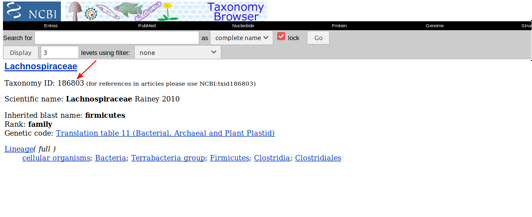
- go on the NCBI taxonomy website. Search for Lachnospiraceae, then click to go to the main page of the family to find the unique taxonomic identifier of the family. It will look like this (the taxonomic ID is indicated with the red arrow):

- execute the script using the family taxon ID. Since the Lachnospiraceae family encompass > 100 different species with multiple sequenced genome for each species, we will restrict the search to refseq genome, exclude metagenome derived assemblies, exclude incompletely classified genomes and only keep one genome per species:
1get_ncbi_genome_assemblies.py -t 186803 -rs -ra -e species -o lachnospiraceae_assemblies.tab
The search will take some time because the script perform a search for each species to identify the highest quality genome (complete genome whenever possible). In this particular case (in october 2018), this search reported a total of 706 genomes assemblies classified in 478 different taxon identifiers. After filtration, the number of genomes was reduced to 106 (keeping only 1 genome/species and excluding metagenome dervied assemblies and incompletely classified genomes).
The resulting table contain the following colums:
- target_rank ==> name of the target rank
- rank_taxid ==> NCBI taxid of considered rank (the species in this case)
- representative_species ==> the name of the selected representative genome
- taxid_representative_species ==> the taxid of the selected representative genome
- assembly_name ==> NCBI assembly name
- RefSeq ==> refseq accession (if available)
- Genbank ==> genbank accession
- contig_count (number of contigs of the representative genome)
- status ==> status of the selected genome (Complete, Scaffold, Contig,...)
- repres ==> is the selected genome an NCBI reference or representative genome?
- length ==> length of the assembly
- clade
- n_subtaxid_available
- no_rank
- superkingdom
- phylum
- class
- order
- family
- genus
Download gbff files
- The 106 assemblies can be downloaded based on their refseq accessions (e.g GCA_000424105.1).
1# with the option -g, only the gbff file will be downloaded (sequence + annotations in [https://www.ncbi.nlm.nih.gov/Sitemap/samplerecord.html genbank format])
2assembly_accession2genome.py -i GCA_000424105.1 -g